If you need
A current mainstream multicolor FDM setup
Start with ANYCUBIC Kobra 4 Combo
The 260 mm cube build volume and included ACE 2 Pro provide standard 4-color printing with expansion to 8 colors.
ANYCUBIC Promo Code & Official Savings
ANYCUBIC’s official U.S. store lists product prices, selected bundles and material offers. Compare the exact printer or material variant and confirm the final price in the cart.
Official-source evidence
Every item below was checked on a ANYCUBIC-owned page on Oct 1, 2026. Offers can change, so the linked official page is the source of truth at checkout.
Scroll horizontally to view conditions, official sources and dates.
| Offer | How to get it / conditions | Official ANYCUBIC source | Verified |
|---|---|---|---|
| Anniversary prices and bundles | The official U.S. store displays current anniversary pricing, selected bundles, and material offers. Confirm the selected variant and price in the cart. | https://us.anycubic3d.com/ | Oct 1, 2026 |
Official-source FAQ
ANYCUBIC’s official U.S. store lists product prices, selected bundles and material offers. Compare the exact printer or material variant and confirm the final price in the cart.
Use only the ANYCUBIC-owned source links in the table above. If an official page does not show a code and its conditions, RecentProfit does not publish it as current.
Follow the terms attached to the specific ANYCUBIC offer. Do not assume codes stack; confirm the final discount in the official checkout before paying.
Decision guide
If you need
Start with ANYCUBIC Kobra 4 Combo
The 260 mm cube build volume and included ACE 2 Pro provide standard 4-color printing with expansion to 8 colors.
If you need
Start with ANYCUBIC Kobra S1 Max Combo
It expands to a 350 mm cube, adds an enclosed CoreXY platform, active chamber heating, higher-temperature hardware, and up to 16-color support.
If you need
Start with ANYCUBIC Photon Mono 4 Ultra
Its 17 × 17 μm XY pixel size and smaller build volume prioritize fine detail in a compact machine.
If you need
Start with ANYCUBIC Photon Mono M7 Pro
Its 223 × 126 × 230 mm build volume, 14K-class screen, LightTurbo 3.0 architecture, and faster workflow make it the higher-capacity resin choice.
Side-by-side
Scroll horizontally to compare all models →
| Compare |  ANYCUBIC Kobra 4 Combo ANYCUBIC Kobra 4 Combo | 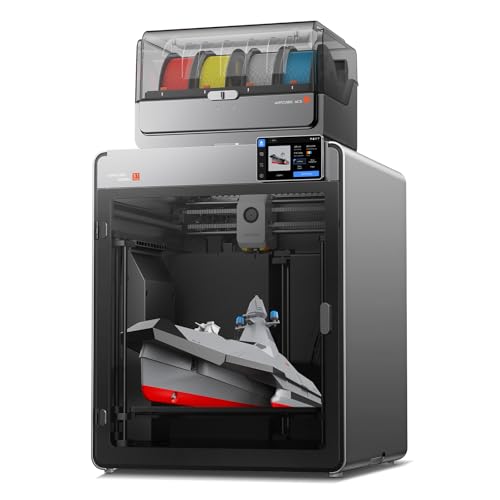 ANYCUBIC Kobra S1 Max Combo ANYCUBIC Kobra S1 Max Combo |
|---|---|---|
| Best for | Mainstream open-frame multicolor FDM printing | Large-format enclosed multicolor FDM |
| Build volume | 260 × 260 × 260 mm | 350 × 350 × 350 mm |
| Max print speed | 600 mm/s max; 300 mm/s recommended | 600 mm/s max class; 300 mm/s recommended class |
| Auto leveling | LeviQ 3.0 auto leveling + Z-offset workflow | LeviQ-family automatic leveling workflow |
| Enclosed / open | Open / gantry system | Fully enclosed CoreXY |
| Multi-color support | 4 colors with included ACE 2 Pro; up to 8 with additional supported hardware | Combo supports multicolor expansion up to 16 colors with the supported ACE ecosystem |
| Hotend / nozzle | Hardened-steel 0.4 mm standard nozzle; max 300°C; optional nozzle sizes available | Hardened-steel 0.4 mm standard nozzle; max 350°C |
| Connectivity | USB, Anycubic Slicer, Anycubic app; built-in monitoring camera in current Combo configuration | Anycubic connected/app ecosystem; retain exact port-level wording from the locked product page |
| Current deal | No qualifying current deal | No qualifying current deal |
| Product link | View on Amazon | View on Amazon |
Side-by-side
Scroll horizontally to compare all models →
| Compare | 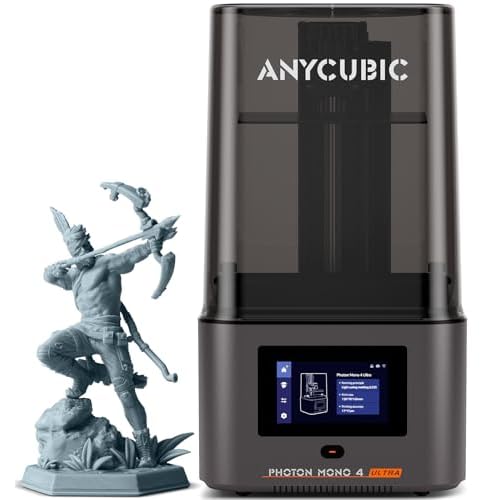 ANYCUBIC Photon Mono 4 Ultra ANYCUBIC Photon Mono 4 Ultra | 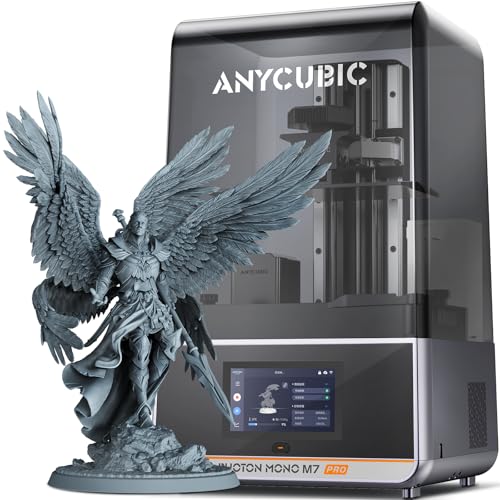 ANYCUBIC Photon Mono M7 Pro ANYCUBIC Photon Mono M7 Pro |
|---|---|---|
| Best for | Compact high-resolution resin printing | Larger, faster resin printing with more workflow automation |
| XY resolution | 17 × 17 μm | 16.8 × 24.8 μm |
| Build volume | 153.4 × 87 × 165 mm class | 223 × 126 × 230 mm |
| Light source | COB light source + Fresnel lens / light-uniformity architecture | LightTurbo 3.0 / COB + Fresnel architecture |
| Print speed | Up to 120 mm/h with the specified high-speed workflow; preserve resin/layer-condition context | Up to 170 mm/h with high-speed resin; standard-resin speed is lower, so preserve test-condition context |
| Auto leveling | No — 4-point manual leveling | Leveling-free / automatic workflow per M7 Pro architecture |
| Intelligent monitoring | Multiple intelligent detection functions are supported on the exact product page | Component, resin, failed-print, release-film, and build-plate detection features are part of the current M7 Pro workflow |
| Wash/cure ecosystem | Compatible with ANYCUBIC resin post-processing ecosystem; wash/cure equipment is separate unless an exact bundle states otherwise | Compatible with ANYCUBIC resin post-processing ecosystem; wash/cure equipment is separate unless an exact bundle states otherwise |
| Current deal | No qualifying current deal | No qualifying current deal |
| Product link | View on Amazon | View on Amazon |
Evergreen reference
Best for: Current mainstream multicolor FDM
A 260 mm cube open-frame FDM setup with the included ACE 2 Pro for standard four-color printing and supported expansion to eight colors.
Current qualifying deal
No current qualifying deal
Best for: Large-format enclosed multicolor FDM
A 350 mm cube enclosed CoreXY platform with active chamber heating and supported multicolor expansion up to 16 colors.
Current qualifying deal
No current qualifying deal
Best for: Compact high-resolution resin printing
A compact resin printer with 17 × 17 μm XY pixel size and a smaller build volume aimed at fine-detail work.
Current qualifying deal
No current qualifying deal
Best for: Faster, larger, more automated premium resin printing
The locked M7 Pro configuration provides a 223 × 126 × 230 mm build volume, LightTurbo 3.0 architecture, and a more automated workflow.
Current qualifying deal
No current qualifying deal
Buying checklist
Common questions
Kobra 4 Combo is the smaller open-frame mainstream multicolor choice. S1 Max Combo adds a 350 mm cube, enclosure, active chamber heating, hotter hardware, and a larger multicolor expansion ceiling.
No. The included ACE 2 Pro provides the standard four-color workflow; reaching eight colors requires additional supported hardware.
Because base-printer and Combo packages are materially different purchase configurations. The selected row is specifically the Combo configuration.
Mono 4 Ultra has a very fine 17 × 17 μm pixel size in a smaller build area; M7 Pro provides much more build volume and workflow automation.
To keep one stable production identity. B0CX1WR6ZS is the selected Amazon US M7 Pro configuration for this handoff; do not silently swap to another listing.
Not unless the exact locked bundle explicitly includes it. Treat wash/cure gear as a separate ecosystem cost.