Keyboard Comparisons · 8 min read
Keychron K2 vs K3: Standard Height or Low Profile?
A version-specific Keychron K2 Version 3 vs K3 Version 3 comparison: profile, battery capacity, switch compatibility, connectivity, and review-backed trade-offs.
Updated Oct 12, 2026
Research date Oct 12, 2026
Quick Verdict
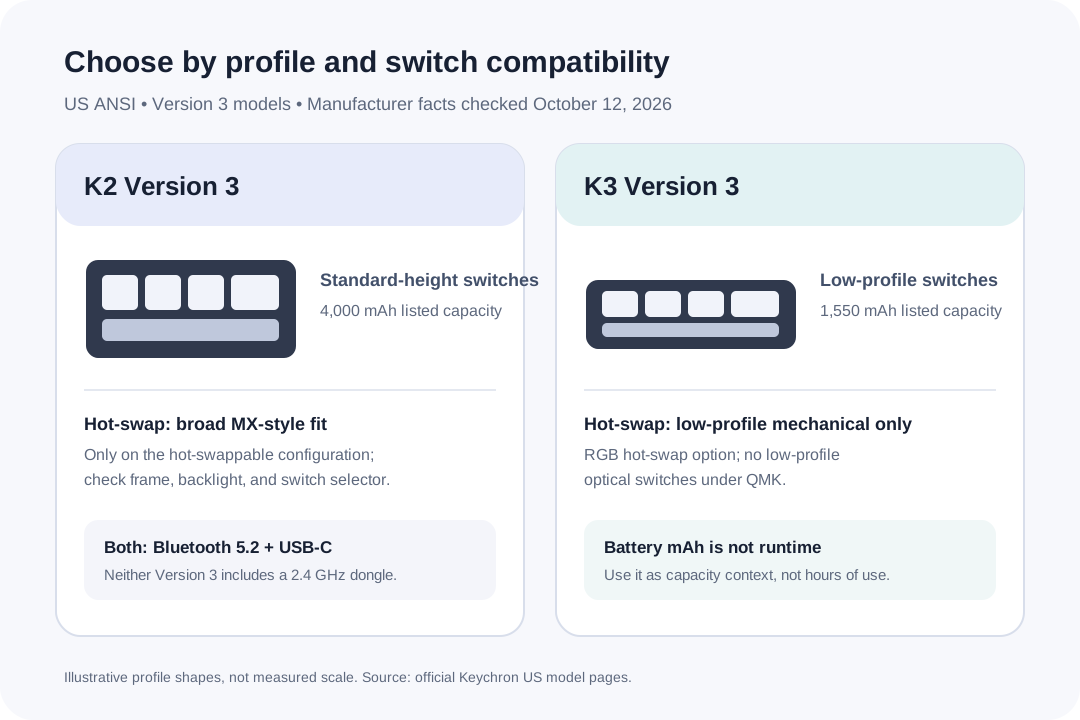
Choose the K2 Version 3 if you want a standard-height mechanical board and a hot-swap version that accepts common 3-pin and 5-pin MX switches. Choose the K3 Version 3 if reducing keyboard height matters more and you are comfortable with its low-profile switch choices. Both offer a 75% layout, QMK, Bluetooth 5.2 for up to three devices, and USB-C wired use. Neither has a 2.4GHz receiver.
This page compares the US ANSI K2 Version 3 and K3 Version 3, not the K2 Version 2, older K3 revisions, K2 Max, K3 Max, or magnetic-switch HE models. On the K3, the hot-swappable option is a particular RGB configuration; on either keyboard, check the selected version and switch type before placing an order.
Current Price and Purchase Links
This comparison has no independently verified live offer for the exact US K2 Version 3 or K3 Version 3 configurations, so it does not show a fixed price or tracked retailer button. Open the official K2 Version 3 page and official K3 Version 3 page to check the currently selected backlight, frame, switch, stock status, and price.
The manufacturer product pages say that a discount code cannot be used for either Version 3 model. That product-specific exclusion does not establish whether a sale price is currently shown. RecentProfit did not conduct a checkout test. This is a source-based comparison, not a RecentProfit hands-on keyboard test.
What Changes Between the Two Version 3 Boards?
The official US product pages were checked October 12, 2026: K2 Version 3 and K3 Version 3. These specifications identify the selected generation; they do not predict how a particular person will type.
Scroll horizontally to compare all columns →
| Decision point | K2 Version 3 | K3 Version 3 | What to check |
|---|---|---|---|
| Typing profile | Standard-height mechanical switches | Low-profile mechanical switches | The profile changes hand position and travel feel; try the style you already know if possible. |
| Hot-swap choices | Hot-swap version supports common 3-pin and 5-pin MX-style mechanical switches | Only the RGB hot-swap option; limited to compatible low-profile mechanical switches | K3 Version 3 QMK does not support low-profile optical switches. Confirm compatibility before buying spare switches. |
| Battery capacity | 4,000 mAh | 1,550 mAh | Capacity is not a same-condition runtime test. Do not convert this difference directly into hours of use. |
| Wireless connection | Bluetooth 5.2, up to three paired devices | Bluetooth 5.2, up to three paired devices | Neither Version 3 page lists a 2.4GHz dongle; both also support wired USB-C. |
| Polling rate listed by Keychron | 125 Hz over Bluetooth; 1,000 Hz wired | 90 Hz over Bluetooth; 1,000 Hz wired | These are manufacturer specifications, not a controlled input-latency test. |
| Size and weight listed by Keychron | 84-key 75%; about 813 g plastic or 971 g aluminum | 84-key 75%; 540 g | The K2 figure depends on frame option. Compare the exact frame and desk space you plan to use. |
Independent Review Trade-offs
These are separate reviews of the named Version 3 models, not a controlled head-to-head test. The K2 account is an independent owner's one-month report; its layout observations come from a reviewer accustomed to JIS keyboards. BGR's K3 review describes one review unit and its reviewer's own adjustment to the typing feel.
Scroll horizontally to compare all columns →
| Review observation | K2 Version 3 | K3 Version 3 |
|---|---|---|
| Positive 1 | The owner found the red switches easy to press for longer writing sessions. | The reviewer liked the slim, tidy design and full-size function row in the compact layout. |
| Positive 2 | The owner preferred its key feel and look to a low-profile office keyboard. | The reviewer found the Keychron Launcher useful for key mapping, macros, and firmware updates. |
| Positive 3 | The owner's one-month report remained positive about daily typing on the board. | The reviewer reported getting used to the key spacing after a few days and liked the typing feel. |
| Caution 1 | The owner found the board thick and heavy for casual carrying. | The reviewer noted there is no 2.4GHz dongle connection. |
| Caution 2 | The red switch felt lighter than the owner expected. | The reviewer needed time to adjust to the spacing and low-profile typing feel. |
| Caution 3 | The owner said the typing sound was louder than expected and dust gathered around the keys. | The K3 reviewer's desired dongle option is absent; do not assume Bluetooth behavior will match a 2.4GHz keyboard. |
Sources: Lifelog Base's K2 Version 3 owner review (August 25, 2026; reviewer's country not established) and BGR's K3 Version 3 review (December 22, 2024). The reviews describe different people and are not a direct comparison. Review-era prices are omitted.
Which One Fits Your Desk?
Pick the K2 Version 3 when you want a conventional switch profile, a larger stated battery capacity, or more freedom to replace MX-style switches on the hot-swap configuration. Its weight and height make it less convenient to pack away every day. K2 Version 3 does not include a wireless 2.4GHz adapter, so choose it for Bluetooth or wired use rather than assuming a gaming-dongle connection.
Pick the K3 Version 3 when the lower board profile is the first requirement and its available low-profile switch choices suit you. The specific RGB hot-swap model cannot accept arbitrary low-profile optical switches: Keychron's page limits compatibility to its listed low-profile mechanical families. If you expect to experiment with a broad switch collection later, the K2's hot-swap version is the less restrictive starting point.
Both are 84-key 75% boards with a function row and no number pad. Both pair with up to three devices over Bluetooth 5.2, work over USB-C, and support QMK and Keychron Launcher. If you need a dedicated low-latency wireless dongle, neither standard Version 3 model solves that; compare a different Keychron Max or HE model by its exact generation and wireless mode.
Switch, Layout, and Code Checks Before Ordering
The K2 Version 3 page lists red, brown, and banana switch options; hot-swap support is tied to the selected model configuration. The K3 Version 3 page lists red, brown, and banana low-profile options and limits optical-switch support. Verify the selector labels on the actual US checkout page rather than relying on a review sample or a variant image.
Both official product pages state that discount codes cannot be used on their respective Version 3 models. This is an exact-model code exclusion, not a statement that the listed price is or is not discounted. Read the current page for stock and delivery before purchase; neither review establishes today's price or availability.
Sources and Method
Official US model pages and the independent reviews above were read on October 12, 2026. Version-specific connectivity, capacity, polling, size, weight, switch compatibility, and discount-code exclusions come from Keychron. Typing impressions are attributed to the reviewers. RecentProfit did not test either keyboard, compare prices at checkout, or confirm a retailer offer for these exact variants.
FAQ
Should I buy the Keychron K2 or K3?
Choose K2 Version 3 for standard-height switches and broader MX-style hot-swap compatibility on the selected hot-swap configuration. Choose K3 Version 3 when a low-profile board is your priority and its limited low-profile switch choices meet your needs.
Are the current K2 and K3 versions the same models as older reviews?
No. This guide compares US ANSI K2 Version 3 with K3 Version 3. It does not substitute K2 Version 2, older K3 revisions, Max models, or HE magnetic-switch models.
Can I put any low-profile optical switch in a hot-swappable K3 Version 3?
No. Keychron says the K3 Version 3 QMK hot-swap configuration supports its listed compatible low-profile mechanical switches and does not support low-profile optical switches.
Does either K2 Version 3 or K3 Version 3 come with a 2.4GHz receiver?
No 2.4GHz receiver is listed for either standard Version 3 model. Keychron lists Bluetooth 5.2 for up to three paired devices and wired USB-C connectivity.
Which keyboard has the larger battery?
Keychron lists 4,000 mAh for K2 Version 3 and 1,550 mAh for K3 Version 3. Battery capacity is not a comparable runtime test, so it does not say exactly how many hours either keyboard will last in your setup.
Can I use a discount code on the K2 or K3 Version 3?
The official Keychron US product pages read October 12, 2026 say a discount code cannot be used for either Version 3 model. That product-specific rule does not tell you whether a sale price is currently displayed.